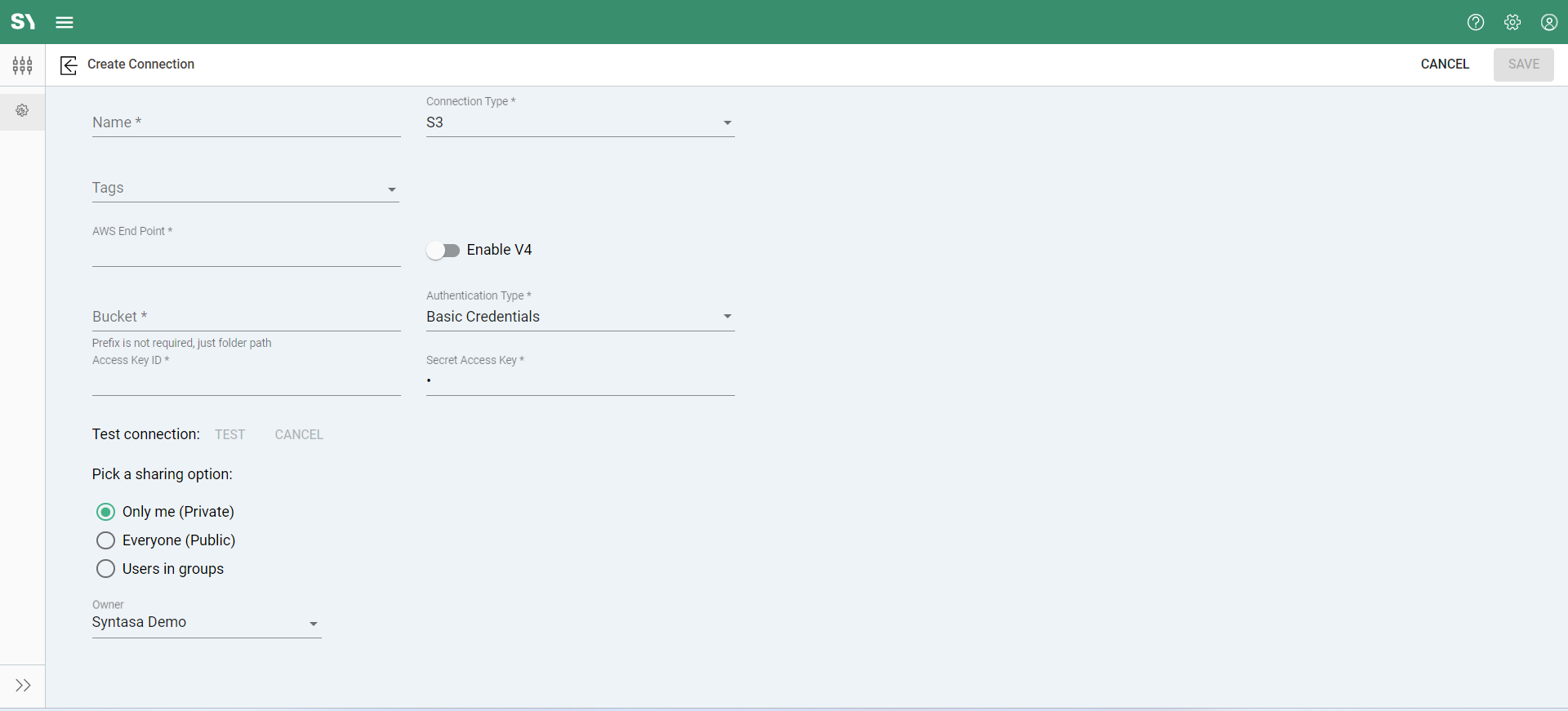
S3 Connection
Simple Storage Service(S3) - This is an Amazon cloud storage service also referred to as "S3 bucket". After selecting 'GCS' as the Connection type, you will be presented with a set of below fields.
- AWS Endpoint: This is the AWS web address for accessing the storage bucket.
- Bucket: The unique container in Amazon S3 where data objects are stored.
- Enable V4 (toggle): You can leave this toggle off, Syntasa services professionals will advise if this should be turned on.
- Authentication Type: Method used to authenticate access to Amazon S3, either through Instance Profile, basic credentials, or session credentials.
Additional fields will be populated based on the Authentication Type you select.
- Instance Profile - This option is only visible when you are on an AWS environment. It provides the option of using the credentials in the GCP instance profile.
- Basic Credentials - You will be shown the following two additional fields for the Basic Credentials Auth type:
- Access Key Id: The unique identifier used to authenticate requests made to Amazon S3.
- Secret Access Key: The secret key is used in conjunction with the Access Key ID to authenticate requests made to Amazon S3.
- Session Credentials: Along with Access Key Id and Secret Access Key, you will be shown following additional field:
- Session Token: Temporary security credentials obtained from AWS Security Token Service (STS) for use with temporary sessions.