User-Defined Process (UDP) Sharing
With the Syntasa 9.1 release, the platform significantly advances how teams collaborate on custom logic through the introduction of Enhanced Sharing for User-Defined Processes (UDPs). This enhancement addresses a key enterprise requirement: enabling teams to share powerful, custom-built data processes across the organization without exposing the proprietary logic or implementation details behind them.
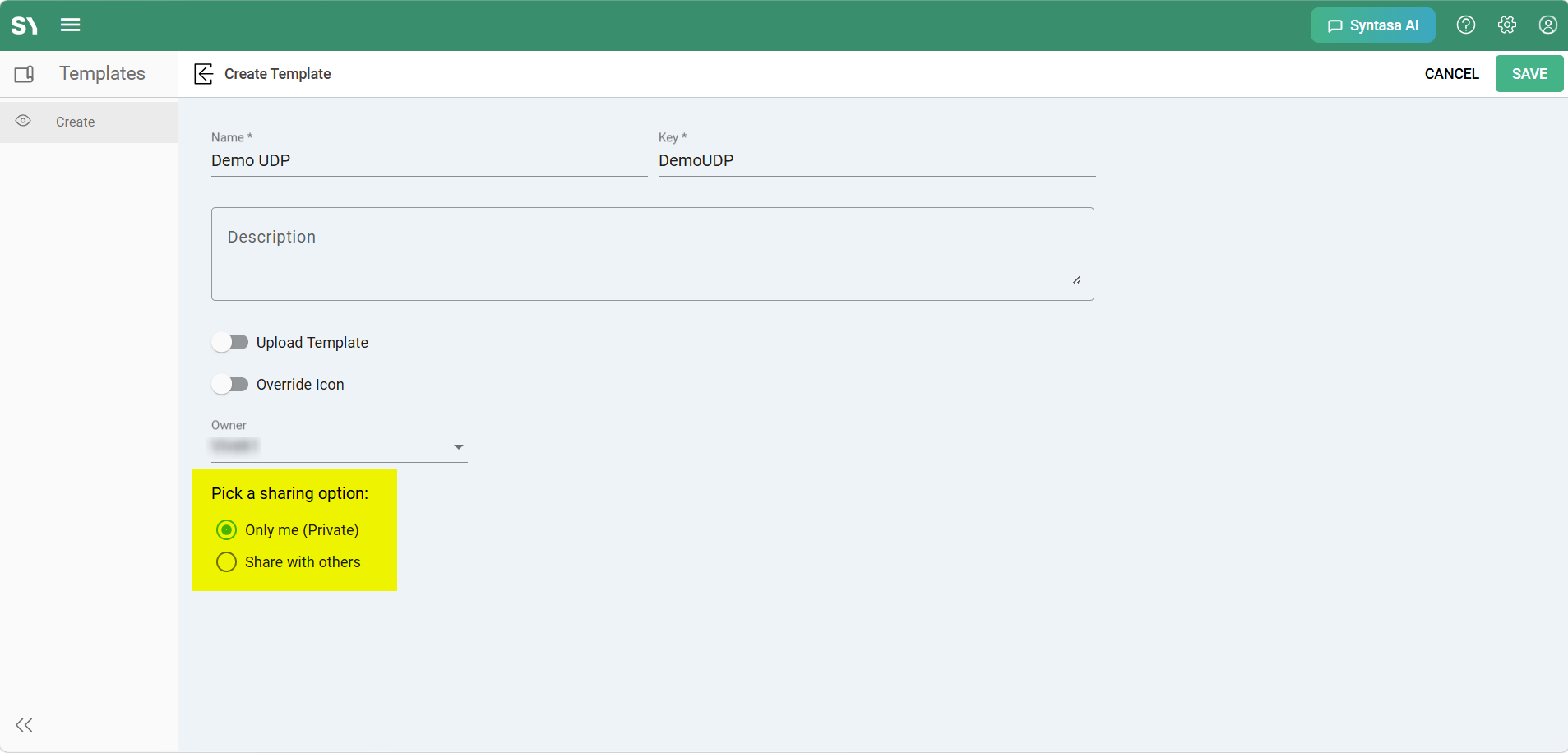
The Evolution of Sharing: Beyond “All or Nothing”
Previously, sharing a UDP in Syntasa followed an all-or-nothing model. Granting another user or group access to a UDP provided full permissions—allowing them not only to use the process within workflows, but also to view and modify the internal logic.
For teams investing significant time developing sophisticated integrations, such as custom Matomo connectors or proprietary attribution models, this created a challenge. Organizations wanted to maximize reuse and collaboration while still protecting the intellectual property contained within the scripts.
Syntasa 9.1 introduces a more flexible and secure sharing model that separates process utilization from process configuration.
Granular Permissions for UDPs
The enhanced sharing framework introduces multiple access levels, enabling administrators and authors to control exactly how UDPs are shared across teams.
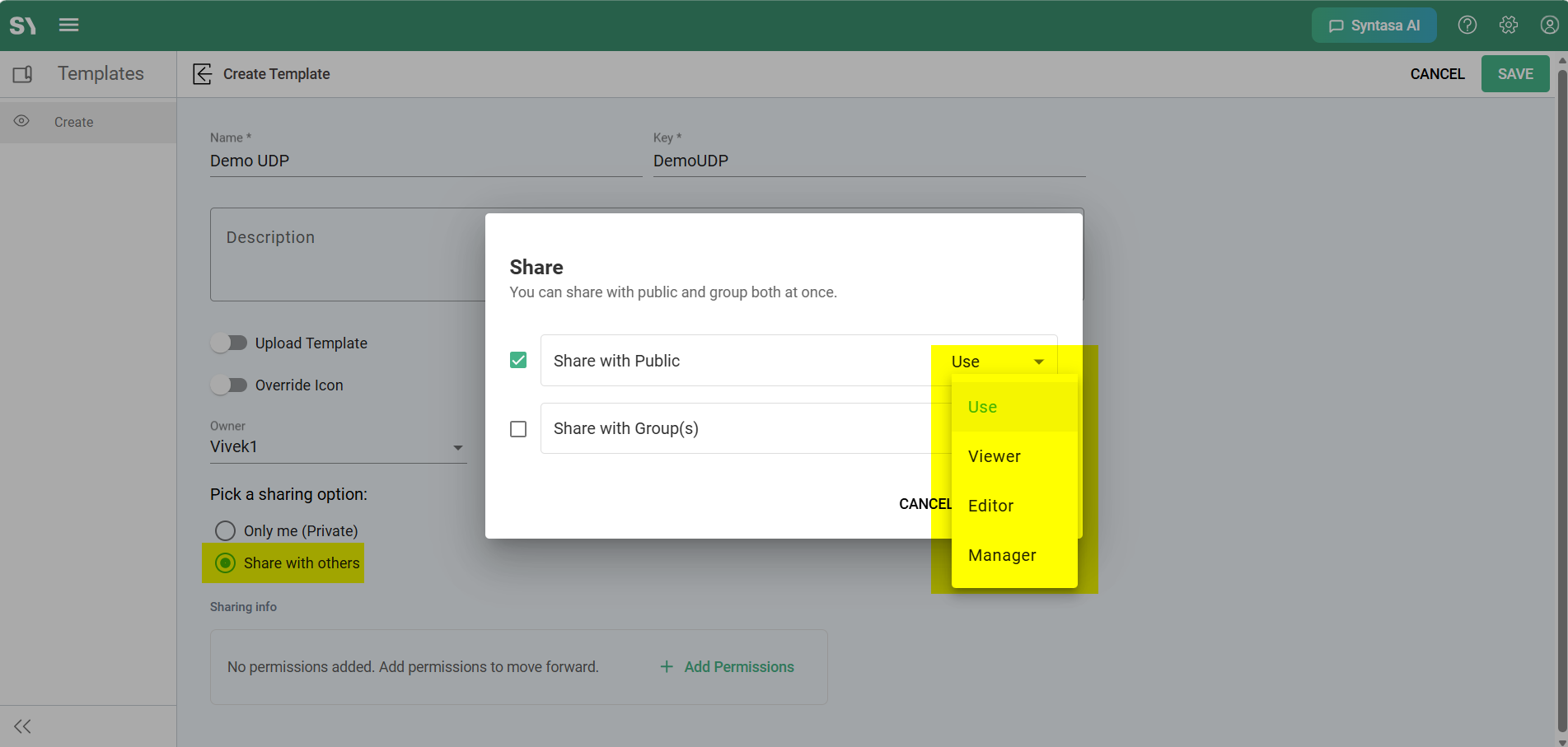
Use (Execute Only)
This is the foundation of the new sharing model. Users with Use access can:
- View the UDP within the process palette
- Add the UDP to workflow canvases
- Execute jobs containing the UDP
However, they cannot:
- Open the UDP definition
- View the source code
- Access internal parameters or configuration details
This allows teams to distribute reusable logic while maintaining full protection of the underlying implementation.
View
The View permission allows users to:
- See the UDP within the directory
- Access associated documentation and metadata
This permission does not automatically grant the ability to use the UDP in workflows unless Use access is also provided.
Editor
The Editor permission is intended for collaborators responsible for maintaining or enhancing the UDP. Users with this permission receive full access to:
- The code editor
- Configuration settings
- Process definitions and implementation details
Manage
The Manage permission provides administrative control over the UDP, including the ability to:
- Delete the UDP
- Modify sharing permissions and access settings
Key Features and User Experience
IP Protection by Design
Authors can now confidently share their custom innovations across the organization while maintaining control over proprietary logic.
By assigning Useaccess to specific users or groups, the UDP effectively functions as a secure “black box.” End users can leverage the functionality without visibility into the internal implementation.
Unified Sharing Interface
Syntasa now includes a standardized sharing component directly within the UDP creation and editing experience.
This unified interface is consistent across the platform, making it easier and more intuitive to manage who can:
- View resources
- Utilize processes
- Edit configurations
- Manage sharing permissions
Workflow Inheritance and Visibility
The platform intelligently manages UDP visibility within the App development environment.
When a UDP is shared using Use access:
- The UDP appears in the process palette for authorized users
- Users can include the UDP in workflows and execute jobs successfully
- If a shared App contains a restricted UDP, users can still view the node within the workflow graph
However, process editing capabilities remain restricted. The Edit Process options are either disabled or hidden based on the user’s assigned permissions.
Documentation Tooltips
To support the “black box” sharing model, authors can now provide concise descriptions for UDPs that appear as tooltips within the process palette.
These tooltips help users understand:
- The purpose of the UDP
- Required inputs
- Expected outputs
This ensures usability and discoverability even when the underlying implementation remains protected.
Why This Matters
Enhanced UDP Sharing transforms Syntasa from a development platform into a true Enterprise Logic Hub.
Enable Center of Excellence (CoE) Teams
Center of Excellence teams can now build, certify, and publish reusable enterprise processes that other teams can confidently adopt without modifying core logic.
Strengthen Security and Compliance
Security and compliance teams gain greater assurance that sensitive business logic and data handling processes cannot be altered by unauthorized users.
Simplify Collaboration
Teams no longer need elevated administrative permissions simply to execute workflows containing custom processes. This reduces operational friction while improving governance.
Conclusion
By balancing open collaboration with enterprise-grade security, Enhanced UDP Sharing in Syntasa 9.1 enables organizations to safely scale reusable data expertise across teams.
The result is a more secure, collaborative, and manageable environment where innovation can be shared broadly without compromising the intellectual property behind it.