Workspace Changes in 9.1 version
Version 9.1 implements a structural overhaul of the workspace environment, transitioning from partitioned user/shared silos to a unified, flattened namespace. This architectural shift eliminates the requirement for navigating segregated shared/ or user-specific subdirectories.In this new paradigm, JupyterLab provides a global root-level view of all workspace assets. This design optimizes for collaborative governance, ensuring that all data, notebook cards, and project configurations are immediately accessible to all workspace members upon entry.
Structural Comparison: Before vs. After
Legacy Structure (Pre-9.1)
Historically, workspaces utilized a dual-zone hierarchy that separated public assets from private user directories. Access to other users' directories was restricted at the file-system level.
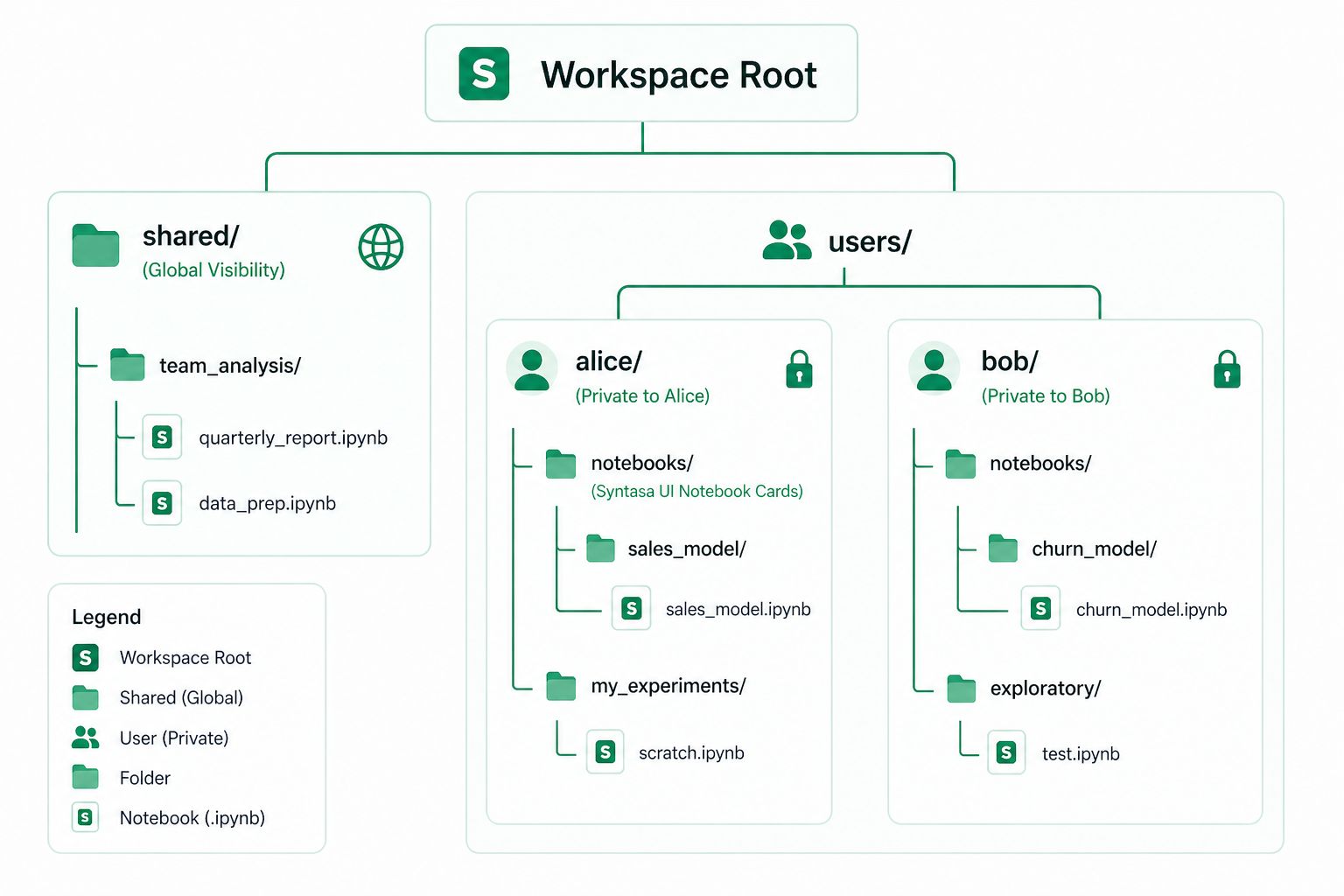
How it worked:
- When Alice opened the workspace in JupyterLab, she saw shared/ and her own username folder (alice/). She could not see Bob's folder.
- Notebook cards (created through the Syntasa UI) were stored inside each user's private notebooks/ folder. Only the creator could see them in JupyterLab.
- The shared folder was the only way to collaborate - users had to manually save files there for others to access.
Unified Collaborative Structure (Version 9.1)
The migration flattens this hierarchy, promoting shared assets to the root and consolidating UI-generated notebook cards into a single, global namespace.
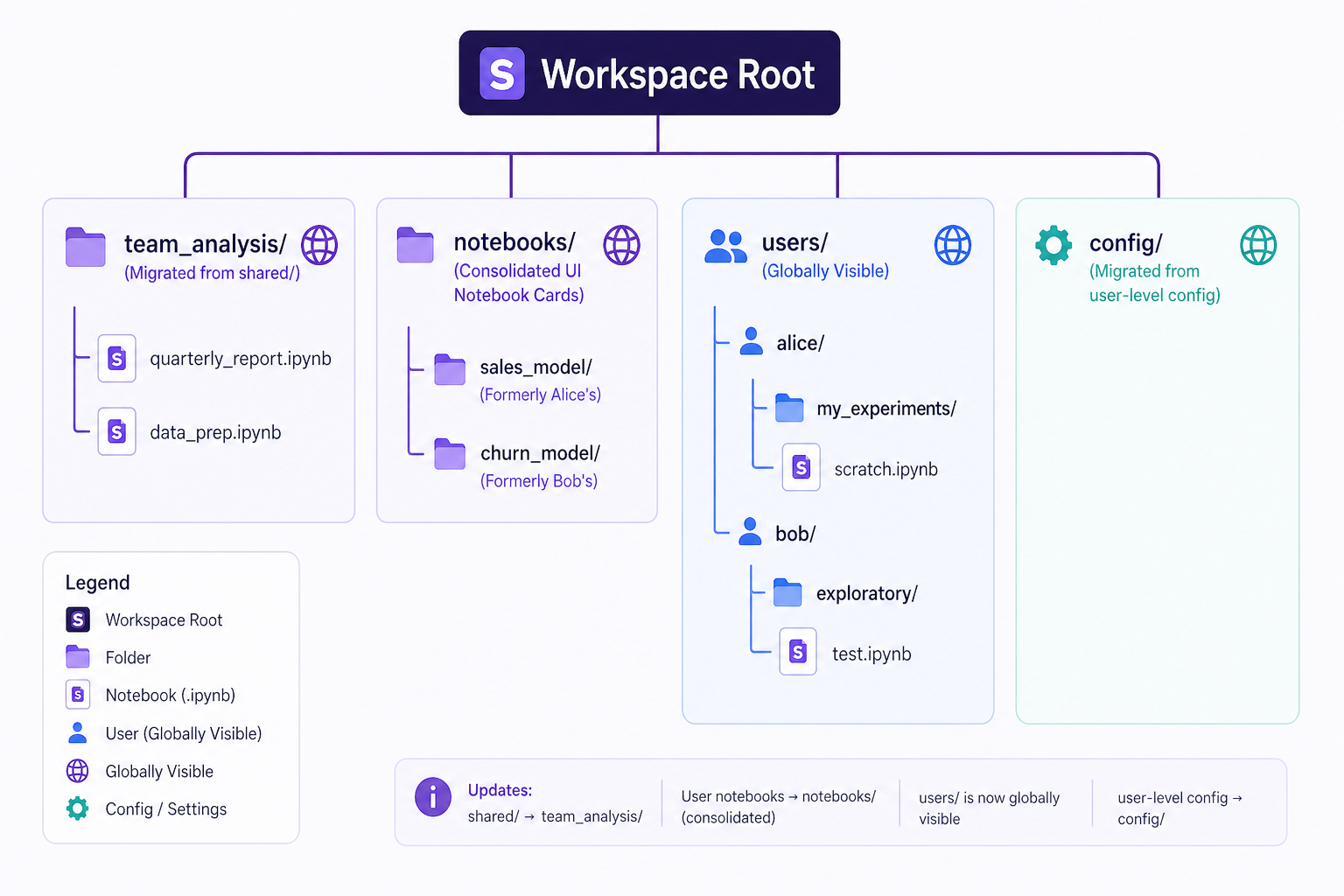
How it works now:
- When anyone opens the workspace in JupyterLab, they see the same root-level view - all files and folders at the top level.
- Notebook cards are in a single notebooks/ folder at the workspace root. They are no longer private to the creator - everyone in the workspace can see all notebook cards.
- Files that were under shared/ are now directly at the workspace root. No need to navigate into a shared/ folder.
- JupyterLab notebooks under your username folder remain in users/{you}/ but are no longer private - all workspace members can now browse into any user's folder
Details
What Happens to My Existing Files?
When you open an existing workspace for the first time after the upgrade, an automatic migration runs:
| What | Where it was | Where it goes |
| Shared files | shared/team_analysis/report.ipy nb | team_analysis/report.ipynb (workspace root) |
| Your notebook cards | users/alice/notebooks/sales_mod el/ | notebooks/sales_model/ (workspace root) |
| Your JupyterLab notebooks | users/alice/my_experiments/ | Stays in place (but now visible to all) |
| SSH/config files | users/alice/config/ | config/ (workspace root) |
Nothing is deleted. A hidden backup of the original shared/ folder is preserved automatically.
What Do I Need to Do?
Nothing in most cases. The migration is automatic and runs once when the workspace is first opened
However, be aware of these changes
- Nothing is private anymore. All files within a workspace are visible to every member of that workspace. Notebook cards that were previously stored in your private folder are now moved to the shared notebooks/ folder at the workspace root. JupyterLab notebooks still under users/{you}/ are also no longer private - other members can browse into your folder. This is by design - workspaces are collaborative spaces.
- Saved notebook processes continue to work. If you have existing processes that reference notebooks from the old shared/ path, they will still run correctly. The system automatically handles the path translation.
- JupyterLab file browser shows everything. You will see all folders at the root level, including the users/ folder containing other members' files. Use folders to keep things organized
Summary
| Aspect | Before | After |
| Workspace mount point | shared/ + users/{you}/ | Workspace root (everything) |
| Shared files | Under shared/ folder | Directly at workspace root |
| Notebook cards | Private per user | Shared (notebooks/ at root) |
| JupyterLab files | Private under users/{you}/ | Still under users/{you}/ but visible to all |
| Collaboration | Must save to shared/ | Everything at root is shared by default |
| File browser view | Only your files + shared | All workspace files |