Contextual Guidance - Process Modes
As data orchestration workflows become more advanced, selecting the correct execution strategy is essential for maintaining data integrity, optimizing performance, and reducing unnecessary processing costs. To help users make more informed decisions, Syntasa 9.1 introduces Contextual Help for Process Modes.
This enhancement provides in-app guidance directly within job configuration and execution screens, helping users clearly understand how each Process Mode interacts with existing tables and partitions before launching a job.
The Challenge: Choosing the Right Execution Strategy
Syntasa supports multiple Process Modes, each designed to control how output tables and partitions are managed during execution. While these options provide flexibility, understanding the differences between modes such as Replace Date Range and Add New Only can sometimes be challenging.
Selecting an incorrect mode may result in unnecessary reprocessing, unintended overwrites, or data inconsistencies. Users often needed to reference external documentation to fully understand the impact of their configuration choices.
The Solution: Integrated Contextual Guidance
Syntasa 9.1 introduces embedded guidance directly into the platform experience across the Create Job, Update Job, Operations, and Audience interfaces.
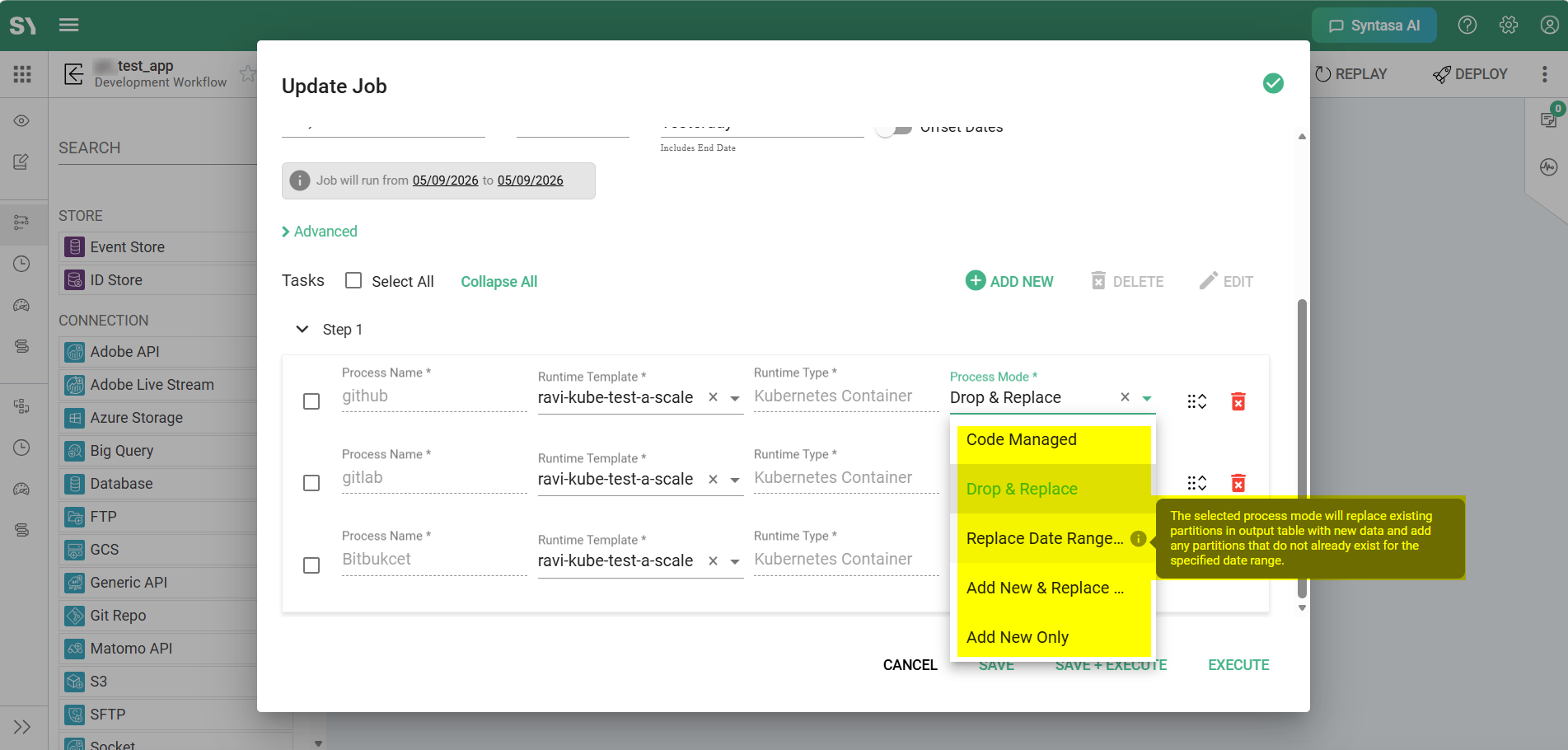
One-Line Descriptions
When a user selects a Process Mode from the dropdown menu, a concise description immediately appears below the selection. This provides instant visibility into the expected execution behavior before the job runs.
Interactive Tooltips
Each Process Mode within the dropdown now includes a contextual information icon (i). Hovering over the icon displays a detailed explanation of the selected mode, giving users deeper insight into how the platform will manage data during execution.
Process Modes in Syntasa
The following contextual help descriptions are now available directly within the platform:
| Process Mode | Description |
|---|---|
| Drop & Replace | The selected process mode will delete the existing table (if any) and creates a new one with the freshly processed data. |
| Replace Date Range | The selected process mode will replace existing partitions in output table with new data and add any partitions that do not already exist for the specified date range. |
| Add New Only | The selected process mode will add only the partitions that do not already exist in the output table for the specified date range. |
| Add New & Replace Modified | This process mode will add partitions that do not already exist in the output table, and update existing partitions if the input source partitions have a newer modified timestamp than the output partitions. |
| Code Managed | Details |
Key Benefits
Eliminate Guesswork
Users can now understand the behavior and impact of each Process Mode directly within the platform without relying on external documentation.
Prevent Data Errors
Clear descriptions help reduce the risk of accidental table drops, partition overwrites, or inefficient reprocessing.
Faster Onboarding
New users can quickly learn Syntasa orchestration concepts through guided exploration and contextual assistance.
Improved Operational Confidence
Operations and engineering teams can execute workflows with greater clarity around how new data will interact with existing datasets.