Process Mode — “Code Managed”
Within Syntasa, Process Modes define how the platform manages the lifecycle of output data generated by a process. In standard execution modes, Syntasa automatically handles operational behaviors such as partition cleanup, date-range filtering, incremental processing, table writes, and execution-state management. These built-in capabilities simplify common ETL and data engineering workflows by allowing developers to focus primarily on transformation logic rather than operational orchestration.
However, not all enterprise data workflows fit neatly into a predefined execution pattern.
Advanced implementations often require highly customized persistence behavior, complex merge logic, external integrations, or specialized state-management rules that cannot be reliably automated by the platform. In these situations, developers may need complete control over how data is written, updated, replaced, or maintained.
The Code Managed process mode is designed specifically for these advanced scenarios.
When a process is configured as Code Managed, Syntasa intentionally steps back from managing the output lifecycle. Instead of automatically handling table writes, partition operations, or execution-state filtering, the platform delegates these responsibilities directly to the custom code authored by the developer.
This effectively transforms the process into a fully developer-controlled execution model where the code itself becomes responsible for:
- Determining what data should be processed
- Managing historical and incremental data logic
- Handling partition operations
- Executing writes and merges
- Managing retries and partial failures
- Maintaining execution consistency
This mode provides maximum flexibility and is intended for experienced developers building sophisticated workflows that require behavior beyond the capabilities of standard process modes.
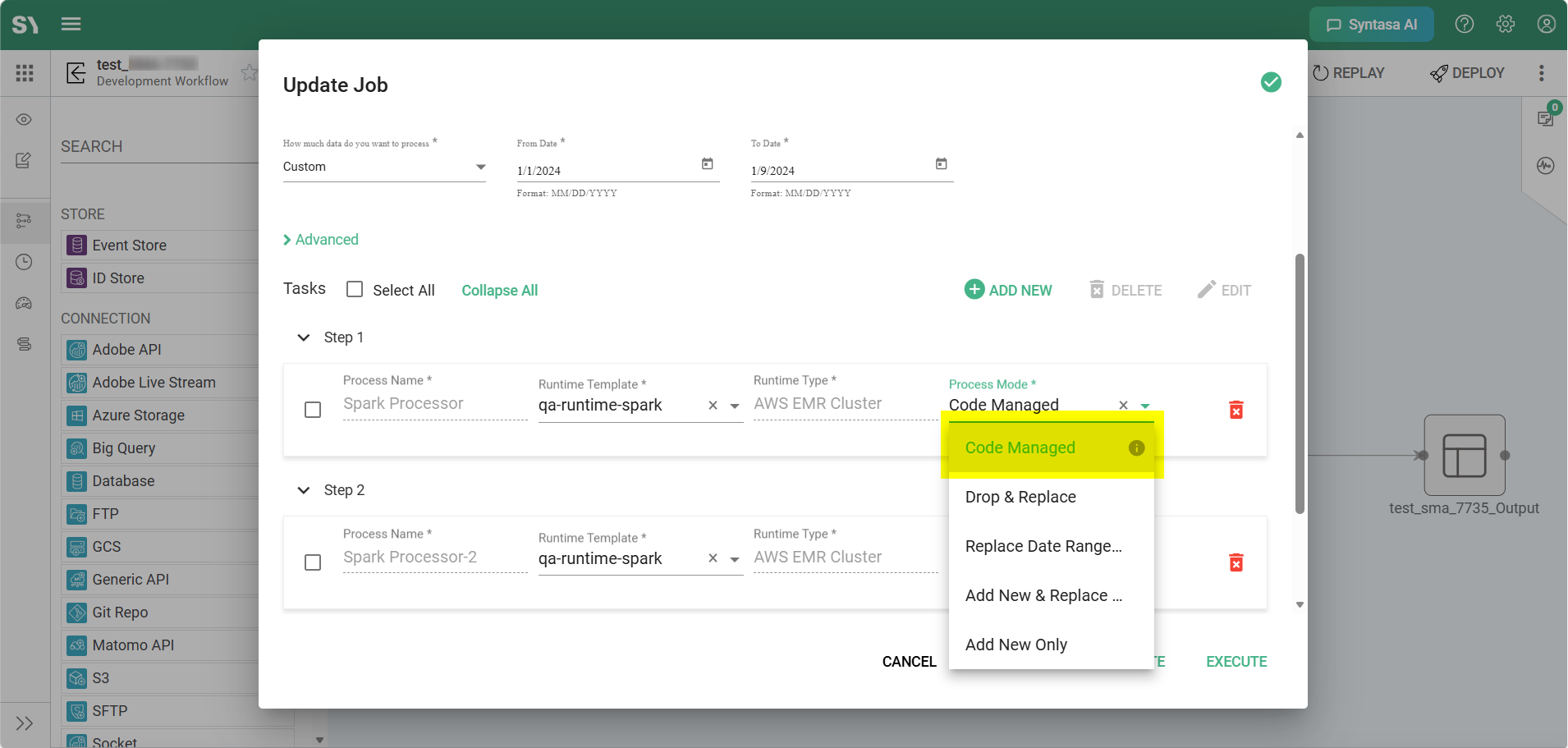
Supported Process Types
The Code Managed option is available for process types where execution behavior is primarily controlled through authored code rather than platform-generated transformations.
Because this mode delegates operational responsibility to the developer, it is supported only in process types that allow direct implementation of custom execution logic.
Notebook Processes
Notebook Processes use JupyterLab notebooks to implement data transformations and orchestration logic using Spark, Python, or related libraries.
When a Notebook Process is configured as Code Managed, the notebook becomes fully responsible for managing the output lifecycle. This includes all write operations, merge behavior, partition handling, and historical processing logic.
Typical examples include:
- Delta Lake merge operations
- Complex deduplication workflows
- ML feature generation pipelines
- Dynamic partition creation
- Multi-table synchronization logic
- Historical backfill processing
In this mode, Syntasa will execute the notebook but will not automatically save resulting DataFrames or manage downstream table states.
Code Processes
Code Processes allow developers to implement custom Spark/Scala or Python execution logic directly within the platform.
These processes are commonly used when teams require:
- Fine-grained Spark optimizations
- Advanced distributed processing behavior
- Custom framework integrations
- Specialized write patterns
- Low-level execution control
When operating in Code Managed mode, the entire persistence lifecycle becomes the responsibility of the custom code implementation.
Examples include:
- Custom Spark partition overwrite strategies
- Dynamic table generation
- Multi-target writes
- Transactional update logic
- External metadata synchronization
User Defined Processes (UDP)
User Defined Processes (UDPs) enable organizations to package reusable custom processing logic into configurable platform components.
For many enterprises, UDPs represent proprietary business logic, reusable framework components, or domain-specific processing standards.
Using Code Managed mode within a UDP allows organizations to encapsulate sophisticated operational behaviors such as:
- Enterprise-standard merge frameworks
- Cross-system reconciliation processes
- Advanced audit tracking
- Dynamic retention management
- Cloud-storage lifecycle orchestration
- Custom state-management frameworks
This is particularly valuable for organizations that want centralized governance while still enabling teams to implement highly customized processing strategies.
How It Works: The Technical Shift
Enabling Code Managed mode fundamentally changes how Syntasa orchestrates execution.
In standard process modes, the platform actively participates in determining what should run, what data should be processed, and how outputs should be managed. In contrast, Code Managed mode removes much of this automation and transfers operational responsibility directly to the code layer.
Two important execution changes occur when this mode is enabled.
Bypassing the “Skip Check”
Standard Platform Behavior
Under normal execution modes, Syntasa performs a pre-execution validation commonly referred to as the Skip Check.
During this phase, the platform evaluates whether there is any new data available for the requested processing window. If the calculated datesToProcess result is empty, the process is skipped automatically to avoid unnecessary compute consumption.
This behavior is highly efficient for traditional incremental ETL workloads where processing should only occur when new data is available.
For example:
- Daily partition loads
- Incremental ingestion pipelines
- Append-only processing
- Scheduled batch transformations
Code Managed Behavior
When a process is configured as Code Managed, the Skip Check is intentionally bypassed.
The process executes every time regardless of whether the platform detects new input data.
This behavior is critical because many advanced workflows are not dependent on simple date-based triggers. The process itself may contain logic that determines whether updates, reconciliations, recalculations, or maintenance operations are required.
Examples include:
- Delta Lake merge operations
- Slowly changing dimension updates
- Data quality reconciliation jobs
- External API synchronization
- Lookup-table refreshes
- Metadata repair operations
- Historical recalculation workflows
In these scenarios, relying solely on platform-managed date detection could incorrectly skip processes that still need to execute.
By bypassing the Skip Check, Syntasa ensures the developer retains complete authority over execution decisions.
Full Date Range Visibility
Standard Platform Behavior
In standard modes, Syntasa filters processing windows according to execution state and previously successful runs.
This means:
- Previously completed dates may be excluded
- Incremental processing windows are narrowed automatically
- The platform controls which partitions are considered active for execution
This approach simplifies common incremental-processing patterns.
Code Managed Behavior
When Code Managed mode is enabled, the State Service returns the full requested date range directly to the process.
The platform does not filter datesToProcess based on prior successful execution history.
This gives the developer complete visibility into the full operational context of the job.
The custom code can then internally determine:
- Which dates should actually be processed
- Which partitions should be replaced
- Which historical records require recalculation
- Which records should be ignored
- Whether existing data should be merged or overwritten
This flexibility is particularly important for workflows involving:
- Historical backfills
- Reprocessing scenarios
- Dynamic dependency management
- Custom state tracking
- Business-rule-driven recalculation logic
Rather than relying on platform assumptions, execution behavior becomes entirely code-driven.
When to Use “Code Managed”
Because this mode transfers significant operational responsibility to the developer, it should generally be reserved for advanced implementations where standard process modes are insufficient.
Custom Upsert and Merge Logic
Many modern data architectures use technologies such as Delta Lake to implement transactional merge operations.
These workflows often require:
- Conditional updates
- Multi-column matching logic
- Partial record replacement
- Conflict resolution
- Slowly changing dimension support
Such logic may exceed the capabilities of standard modes like Add New & Replace Modified.
In these cases, Code Managed mode allows developers to implement fully customized merge strategies directly within Spark or SQL code.
Manual Partition Management
Some organizations implement partitioning strategies that do not align with the default Syntasa partition-management model.
Examples include:
- Multi-level partition hierarchies
- Dynamic partition creation
- Business-calendar partitioning
- Custom retention policies
- Conditional partition replacement
In these situations, developers may need direct control over partition creation and deletion behavior.
Non-Table Outputs
Not every process generates a traditional dataset or table.
Some workflows exist primarily to perform operational actions such as:
- Sending notifications
- Triggering downstream pipelines
- Calling external APIs
- Moving files between cloud-storage systems
- Updating metadata repositories
- Synchronizing external systems
Because these operations do not fit standard table-lifecycle management patterns, Code Managed mode is the preferred execution model.
Complex State Management
Certain enterprise workflows require execution logic that depends on business-specific rules rather than simple platform-managed state tracking.
Examples include:
- Dependency-aware recalculations
- Late-arriving data correction
- Historical reconciliation
- Multi-source synchronization
- Rolling-period recomputation
In these scenarios, the process itself must determine execution boundaries and historical recalculation requirements.
Comparison with Standard Modes
| Feature | Standard Modes (e.g., Drop & Replace) | Code Managed |
|---|---|---|
| Table Creation | Automatically handled by Syntasa | Must be handled explicitly in code |
| Partition Management | Automated by platform rules | Fully controlled by custom logic |
| Skip Logic | Skips execution when no new data is detected | Process always executes |
| Date Range Filtering | Managed by platform state tracking | Full requested range exposed to code |
| Retry and Cleanup | Managed automatically by platform | Must be handled programmatically |
| Historical Reprocessing | Limited to platform state logic | Fully customizable |
| Merge/Upsert Flexibility | Limited to predefined modes | Unlimited custom implementation |
| External System Integration | Limited | Fully supported through custom code |
Best Practices
Because Code Managed mode removes many platform-managed safeguards, following engineering best practices becomes especially important.
Explicit Writing
The platform will not automatically persist your final DataFrame or output object.
Your code must explicitly implement all required write operations, including:
.writesaveAsTable- Delta merge commands
- File export logic
- External API submission logic
Failure to do so may result in successful execution with no persisted output.
Design for Idempotency
Because Skip Checks are bypassed, processes may execute repeatedly for the same processing windows.
Your logic should therefore be idempotent, meaning repeated executions produce consistent results without creating duplicates or corrupting data.
Recommended strategies include:
- Merge-based updates
- Partition overwrite operations
- Transactional writes
- Deduplication safeguards
Implement Robust Logging
Since the platform delegates execution control to the code layer, detailed logging becomes essential for operational observability.
Your process should log:
- Processed date ranges
- Partition operations
- Merge statistics
- Retry attempts
- External API responses
- Failure conditions
Using Syntasa logging utilities helps maintain consistency with broader platform observability practices.
Handle Partial Failures Carefully
In standard modes, Syntasa automatically manages certain cleanup and retry operations.
In Code Managed mode, developers should explicitly handle:
- Interrupted writes
- Partial partition updates
- Transaction rollback behavior
- Retry safety
- External-system failures
Without proper safeguards, partial writes may leave downstream systems in inconsistent states.
Summary
The Code Managed process mode provides maximum execution flexibility within Syntasa by delegating operational control directly to custom code.
Rather than relying on platform-managed lifecycle behavior, developers gain full authority over:
- Data persistence
- Partition management
- Historical processing
- Merge logic
- Execution-state handling
- External integrations
This mode is particularly valuable for advanced enterprise workflows that require sophisticated operational behavior beyond standard incremental processing models.
While it introduces additional responsibility for developers, it also enables highly customized, scalable, and enterprise-grade processing architectures that would otherwise be difficult to implement using predefined platform behaviors alone.