Campaign Workflow: Step 1 [Define Campaign]
Overview
The first step in the configuration wizard is setting up your campaign's metadata and strategic objectives. This ensures your campaign is easily identifiable in the platform and that its performance is tracked against the correct metrics.
Metadata Configuration
-
Campaign Name (Required): Enter a clear, identifiable name. We recommend using a consistent naming convention across your team.
-
Campaign Description: Provide contextual details about the campaign's purpose, strategy, or target audience for future reference.
-
Labels: Apply default tags or create new ones to easily categorize and filter this campaign
- Note: The default labels suggested in the UI (e.g.,
Banner-Affinity,Upsell,Cross-sell) will dynamically populate based on the specific Use Case you selected before entering the workflow.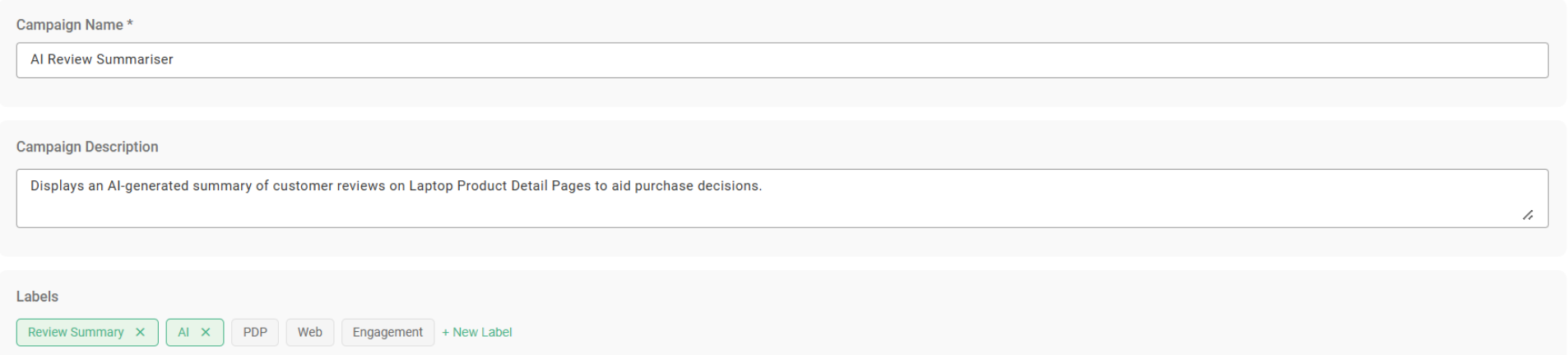
- Note: The default labels suggested in the UI (e.g.,
Primary Conversion Goals
You must select a Primary Conversion Goal to define the core metric of success for your campaign. The available goal options will default dynamically based on the Channel (Web, Email, or Paid Media) you are building for.

Use the framework below to align your Primary Goal with your intended funnel stage:
| Channel | Primary Goal Option | Funnel Stage |
|---|---|---|
| Web | Page View | Awareness & Discovery |
| Click-Through | Consideration & Engagement | |
| Add to Cart | Consideration & Intent | |
| Purchase | Conversion | |
| Form Submission | Lead Generation | |
| Impressions/Reach | Awareness | |
| Click-Through | Consideration | |
| Conversion (Purchase/Lead) | Conversion | |
| Paid Media | Impressions/Reach | Awareness |
| Click-Through | Consideration | |
| Conversion (Purchase/Lead) | Conversion |